
HKRN registration is done on the official portal hkrnl.itiharyana.gov.in under Candidate Registration and Login. It starts with your Parivar Pehchan Patra (Family ID), not with a username. The steps below follow the official “New Candidate Registration” manual (dated 6 November 2023), the portal Help page and the HKRN FAQ.
hkrnportal.com is an independent guide, not the official portal. Never share your OTP with anyone.
Who can register
- Permanent residents of Haryana with a valid Parivar Pehchan Patra (PPP).
- Age 18 to 42 years. The policy allows relaxation of the upper age limit for reserved categories as per Government instructions.
- A working mobile number linked to your PPP. The OTP goes to that number. If you have no PPP or the number is outdated, the official SOP says to visit a CRID centre and fix it first.
Keep these ready
- Family ID (PPP) and the mobile phone linked to it.
- Marksheets and certificates of your qualifications, as PDF files. The education upload accepts only PDF, up to 500 KB, and the file name should not have special characters.
- NSQF skill certificate details, if you have one (certificate number, date and issuing body such as NCVT).
- Experience certificate as a PDF up to 200 KB, plus EPF/UAN and ESI numbers, if you have work experience.
- Father’s death certificate as a PDF up to 200 KB, only if you claim a socio-economic criterion that needs it.
Before the form: verify your Family ID
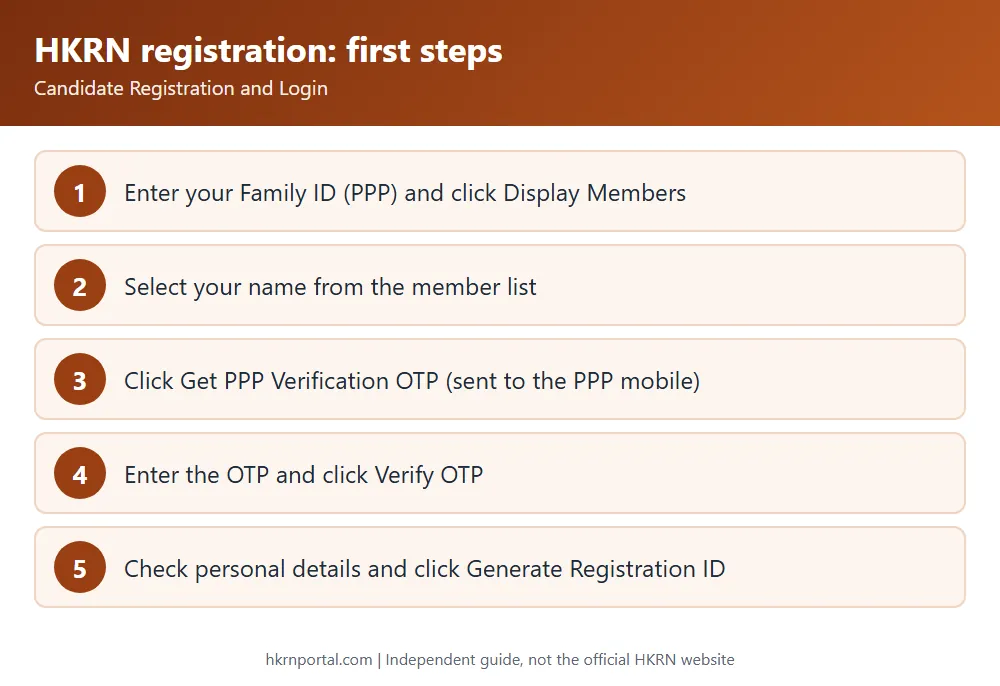
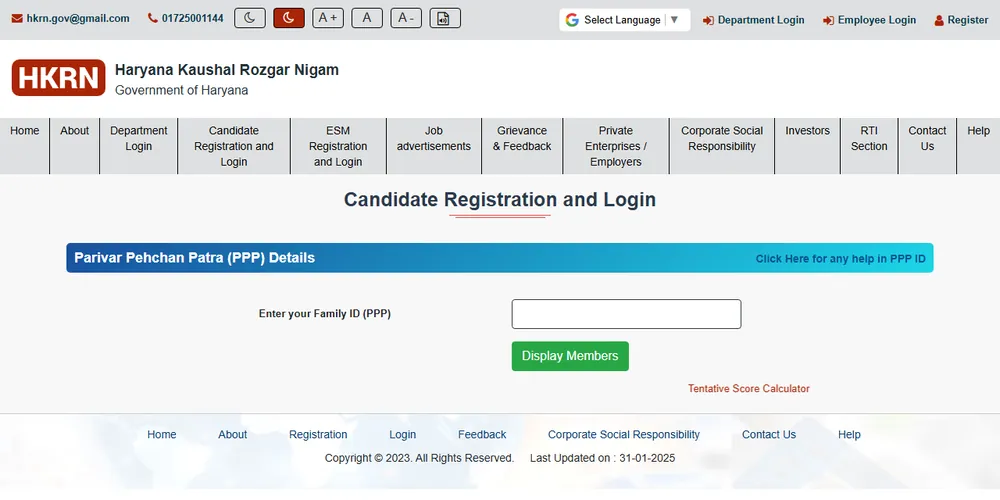
- Open hkrnl.itiharyana.gov.in and click Candidate Registration and Login (ex-servicemen use ESM Registration and Login).
- Enter your Family ID (PPP) and click Display Members.
- Choose your name from the Select Member Name list.
- Click Get PPP Verification OTP. The OTP is sent to the mobile number registered in PPP and is valid for 10 minutes.
- Enter the OTP and click Verify OTP.
Step 1: Personal details and Registration ID
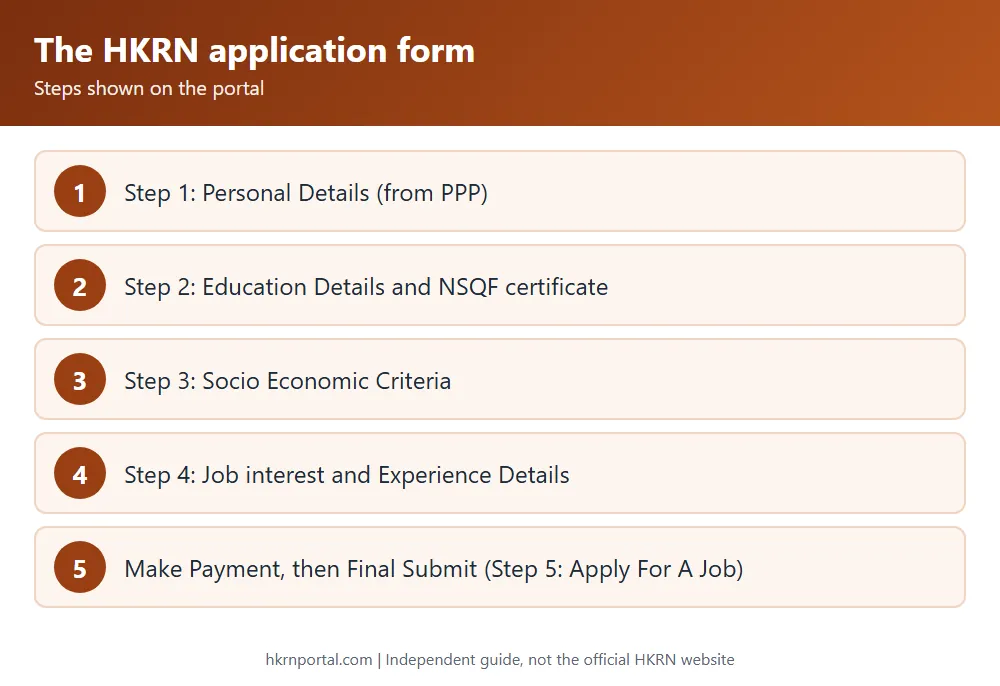
The Personal Details page opens with data fetched from PPP: your name, father’s and mother’s name, date of birth, age, gender, address, district, block or town, village or ward, pincode, mobile number, caste category, highest qualification, current engagement and total annual family income. Check everything and click Generate Registration ID. A pop-up confirms the registration number, and the number is also sent to you by SMS.
You cannot edit these basic details on HKRN. The FAQ says they must be corrected on the PPP (CRID) portal. After that, log in to HKRN, open the Personal Information tab and click Update PPP Details.
Step 2: Education details
- Answer the question “Do you have NSQF Skill Certificate?” If yes, select the certificate, enter its number, date and issuing body, and click Save NSQF Certificate.
- Click Add Education Detail. Fill in the education level, stream, result status, board or university, grading system, date on marksheet, marksheet serial number (numbers only), roll number, marks obtained and total marks. The percentage is calculated for you.
- Upload the certificate as a PDF of up to 500 KB and click Save Details.
Teachers add their HTET details in this step, according to the portal Help page.
Step 3: Socio-economic criteria
The form asks yes or no questions: whether you were orphaned before the age of 25, and whether you are the first or second child whose father died before he turned 42 or before you turned 12. If you answer yes, enter your father’s date of death and death certificate details and upload the certificate. Click Save, then Next.
Step 4: Job interest and experience
- Under Select Your Job Interest, pick the job level and the job you want, tick the declaration and add it as a preference. The portal notes that a preference does not entitle you to that job.
- Under Experience Details, say whether you have experience. For Haryana Government, Board or Corporation experience, choose the department, the DDO, the place of job and the job activity, so that the DDO can verify it. Otherwise choose private or enterprise experience.
- Enter the outsourcing agency, the from and to dates, EPF/UAN and ESI numbers, and upload the experience certificate.
- Tick the final declaration.
Payment and Final Submit
Click Make Payment and complete the fee. Then click Final Submit. Step 5 on the portal is Apply For A Job. The FAQ mentions an application fee but does not state the amount, so check it on the portal at the time of payment. If you have paid and the status still shows not paid, the FAQ asks you to wait for the payment to reflect and then contact HKRNL.
After registration
- Your score: after final submission, your score table appears in your profile.
- Adding experience later: raise a portal re-open request to add experience or upload documents after final submit.
- Applying for jobs: registration alone is not an application. Apply for posts from the Job Advertisements page. See the vacancy guide.
- Experienced candidates: HKRNL’s SOP for experienced candidates says you are considered for upcoming vacancies only after the DDO verifies your Haryana Government experience on the portal.
Frequently asked questions
Can I register on HKRN without a Family ID? No. The Family ID is the first field, and the OTP goes to the PPP mobile number.
My name or date of birth is wrong. What do I do? Correct it on PPP, then use Update PPP Details in the Personal Information tab.
How do I update my education after final submit? The Help page says to log in with your registered mobile number and OTP, add the details in Step 2 (Education), save, and click Final Submit in Step 4. If the form is locked, raise a portal re-open request.
What if I cannot log in? The FAQ asks you to email hkrn.gov@gmail.com with your Registration ID, Family ID, Member ID and a screenshot of the error.
Related: HKRN login, merit score, eligibility and job levels.